
Almost every modern lightsaber runs on a single 18650 lithium-ion cell, and almost every “my saber is broken” report traces back to that cell rather than to the saber. The two numbers that decide whether it works are continuous discharge current, not capacity, and whether the cell is protected.
Capacity is what shoppers compare, and it is the less important of the two.
A neopixel blade pulls several times more current than the cell in a flashlight, so a cell chosen for runtime alone will sag or trip under the load.
The same cell also has a narrow band of voltages it is happy in, and leaving a saber to sit until the blade fades takes it out of that band permanently.
This page covers what the numbers on an 18650 mean, how much current a blade actually draws, how long a charge really lasts, what the charging circuit will and will not accept, why a switched-off saber still drains, and how to tell a recoverable cell from a dead one.
What’s on This Page
- Why a Saber Needs a High-Drain Cell
- What an 18650 Actually Is
- Protected, Unprotected, Button and Flat Top
- How Long a Charge Actually Lasts
- Charging: Voltage, Time, and What Not to Do
- Standby Drain and the Kill Key
- Storage and Longevity
- When the Saber Will Not Turn On
- Frequently Asked Questions
Why a Saber Needs a High-Drain Cell
A saber’s current draw is set by the blade, and the blade is the largest load most people will ever put on an 18650. A strip blade running white can pull several times the current of the same cell driving a flashlight, which is why cells sold on capacity alone fail here.
The reason is the number of emitters and how hard they are driven.
In a strip blade, each individual pixel draws a small current — on the order of tens of milliamps when it is at full brightness on a white setting. Multiply that by the pixel count and the total stops being small.
A 144-pixel strip at full white lands in the high single digits to low teens of amps. A longer strip or a brighter configuration goes higher still, and the peak is worst on white, because white is every colour channel on at once.
This is why “high drain” is the specification that matters. A cell’s continuous discharge rating is the current it can supply without dropping voltage or heating up. Ask it for more and one of two things happens: the voltage sags, the board browns out and resets mid-swing, or — on a protected cell — the protection circuit trips and the saber simply dies.
The green bar is the only part of this chart the cell does not have to worry about. Everything above it is set by the blade.
Read the bars rather than the capacity figure on the wrapper. Two cells can both say 3,000 mAh and behave completely differently in a saber, because one is built to deliver that capacity slowly and the other quickly.
High capacity and high current pull in opposite directions inside the same physical size. Pushing capacity up generally costs discharge rating, which is why the highest-capacity cells are usually the wrong choice for a bright blade.
The practical target for a strip-blade saber is a cell rated for continuous discharge of 10 A or more. Below that, the cell is a flashlight cell wearing a compatible size.
What an 18650 Actually Is
The name is a set of dimensions: 18 mm across and 65 mm long. Nominal voltage is 3.7 V, it charges to 4.2 V, and the useful discharge floor is around 2.5 V. Capacity in this format runs from roughly 2,000 to 3,600 mAh.
Those three numbers — diameter, length, voltage — are what you are matching when you buy a replacement.
The diameter and length decide fit. The voltage is fixed by the chemistry and is the same across every 18650 you will find, so it is not a comparison point.
Capacity is where cells differ, and it is also where the trade-off lives.
| Figure | Value | What it decides |
|---|---|---|
| Diameter | 18 mm | Whether it enters the hilt’s battery tube |
| Length | 65 mm nominal | Whether the contacts reach; protected cells are longer |
| Nominal voltage | 3.7 V | Set by chemistry; identical across the format |
| Full charge | 4.2 V | Where the charging circuit must stop |
| Discharge floor | about 2.5 V | Where protection cuts off; below this the cell is damaged |
| Capacity | roughly 2,000–3,600 mAh | Runtime, traded against discharge rating |
| Continuous discharge | varies widely by cell | Whether the blade gets the current it asks for |
The single most useful habit is to read the discharge rating before the capacity. Capacity tells you how long the saber runs once it is working; discharge rating decides whether it works.
An RGB saber with a simpler blade can be satisfied by a lower-rated cell, and one of the mid-capacity cells around 2,000 mAh is a reasonable fit there. A strip blade is not.
Protected, Unprotected, Button and Flat Top
Protected cells carry a small circuit board that cuts the connection on over-current, over-charge, over-discharge and short circuit. Unprotected cells have no such board and rely on the device. Button and flat top describe only the shape of the positive terminal and are independent of protection.
Protection is the safety argument for a cell that lives inside a metal tube next to a hand.
It is also the source of most confusion, because the protection board has its own current limit that is lower than the cell underneath it.
A cell rated for 10 A continuous may come as a protected version whose circuit trips at around 7 A. The cell is fine; the board is the bottleneck. A higher-rated cell with an aggressive board can behave the same way, usable only in the range below where its protection engages.
That is the mechanism behind a saber that dies under a bright blade while the battery tests as healthy on a charger.
Length is the second thing protection changes. A bare cell is about 65 mm. The added board and the wrap push a protected cell to roughly 68 to 70 mm, which is enough to stop a hilt’s end cap from closing on a tube sized for the bare length.
Terminal shape is separate again. A button top has a raised positive contact like a familiar household cell; a flat top is flush. Which one you need is decided entirely by whether the hilt’s contacts are a spring and a plate that expect the raised shape.
A button top is not automatically protected and a flat top is not automatically bare. The two attributes are chosen independently, and the label usually states them separately.
How Long a Charge Actually Lasts
A single-blade strip saber on one 18650 typically runs around an hour at usable brightness. Published figures of two to four hours describe simpler blades at lower output. The gap between the two is the blade, not the cell.
This is the number buyers find most surprising, and the explanation is the current figures earlier on this page.
Runtime is capacity divided by draw. A 3,000 mAh cell is roughly 3 amp-hours; a blade pulling 8 to 10 A consumes it in well under an hour of continuous full-white operation.
Reduce the draw and the runtime stretches. A dimmer setting, a shorter blade, a less demanding colour, or a simpler blade type all move the figure in your favour, and that is where the multi-hour claims come from.
| Setup | Typical continuous runtime | Why |
|---|---|---|
| Strip blade, full brightness | about an hour | Highest draw; white settings worst |
| Strip blade, reduced brightness | noticeably longer | Draw scales roughly with output |
| Simpler multi-die blade | several hours | A few amps rather than many |
| Double or triple blade | around an hour at best | Two or three blade loads on one cell |
| Idle with blade running, no motion | close to the same | Blade current dominates; motion effects are small |
Plan for a spare rather than for a longer cell. A second charged cell is cheaper and more reliable than trying to buy runtime out of a format that is already near its ceiling.
Larger formats exist and give more capacity, but they need a hilt bored for them. Going up a size is a hilt decision, not a battery decision, so it is not a fix you can apply to a saber you already own.
Charging: Voltage, Time, and What Not to Do
A saber’s charging input expects 5 V. A full charge takes roughly three to five hours, less on a cell with a smaller capacity and more on a strip-blade pack. Higher-voltage fast chargers are the wrong tool and the charging circuit is the reason.
Most modern sabers charge through a port on the hilt, with the charging circuit built into the saber rather than into a separate cradle.
That circuit is designed around a 5 V input at around 1 A. It is a small, low-rate charger, and it is deliberate — it is what the cell inside can accept safely without a more sophisticated charging stage.
Supplying 5 V at higher current is tolerated by some sabers and not by others. Supplying anything above 5 V is not.
Charge the saber switched fully off. Not muted, not idle with the blade retracted — powered down. Charging while the board is live puts the load and the charge current through the same path.
Heat is the thing to watch. The hilt warming slightly during a charge is normal. A hilt that becomes genuinely hot is not, and the charge should be stopped and the supply and cable checked before trying again.
A cell should not be asked to run above roughly 45 °C, and a charge that pushes past comfortable warmth is doing exactly that.
Do not leave a saber on a charger for days. Once the cell is full, the useful work is done, and a long unattended dwell adds nothing.
Standby Drain and the Kill Key
A switched-off saber is not a disconnected saber. The board keeps drawing a small standby current, and over weeks that is enough to take a healthy cell down to the point where it will not accept a charge.
On paper the figure is tiny — a well-designed board can idle below a tenth of a milliamp.
In practice the drain is larger than the paper figure and it is continuous. A saber stored assembled with its cell installed can go from full to flat in a matter of weeks.
That matters because of what happens at the bottom of the range rather than the top.
The kill key exists to break that circuit. It is a non-conductive plug that fits the hilt’s recharge port. With nothing in the port, the cell’s negative terminal stays connected to the board, which is what powers standby. Inserting the plug disconnects that path and the saber goes fully dead until the plug is removed.
This is the whole argument for either a protected cell or a kill key — the failure is at the bottom of the range, and it is permanent.
If your saber has a recharge port, it can take a kill key, and using one between sessions removes the standby question entirely.
If it does not, the equivalent habit is to remove the cell when the saber will not be used for a while. A saber parked for a season should not be parked with a cell in it.
Storage and Longevity
Lithium-ion cells age fastest at the two extremes of charge. Store an 18650 around 3.7 to 3.85 V — roughly forty to fifty percent — in a cool, dry place, rather than full or empty.
A full cell held at 4.2 V for months loses capacity it does not get back. An empty cell held near its cut-off is worse.
Half charge sits in the middle of the range where the cell is least stressed, and it is also the safest state to store a cell in on safety grounds.
Charge after use rather than before, keep the cell out of the saber for long gaps, and the cell will hold its capacity across far more cycles.
Temperature does as much damage as voltage. A saber left in a hot car in summer is being stored badly regardless of its charge level, and a cell that has been through that should be watched for swelling before it is used again.
Any cell showing a swollen wrap, a dent, a torn outer sleeve or a scorch mark should be retired rather than charged.
Why White Costs the Most
White is not a setting on the saber. It is all three colour channels driven at full at the same time, so it draws roughly three times what a saturated colour of the same perceived brightness does.
This is the mechanical reason behind the most confusing failure in the hobby: a saber that runs red perfectly and cuts out the moment you pick white.
One Pixel, Three Emitters
Each addressable pixel on a blade strip is not a single lamp. It is a red die, a green die and a blue die packaged together, each with its own brightness control.
Ask for red and one die lights. Ask for white and all three do.
The per-die figure is the useful one to remember: about 20 mA at full output. Red is one of those, so roughly 20 mA per pixel. White is three of them, so roughly 60 mA per pixel — a threefold increase in current for the same number of pixels.
The bar length is the current, not the brightness. White looks similar in brightness to a saturated colour but costs three times the power.
What That Means at Blade Scale
Multiply by pixel count and the small numbers stop being small.
A two hundred pixel strip at 60 mA per pixel lands near 12 A on white. The same strip saturated on one channel lands near 4 A.
That gap is the whole of the brownout story. A cell with a healthy margin handles 4 A without complaint and sags hard at 12 A. A protection board set a little below 12 A latches open and the blade goes dark.
Both failures look identical from the outside, and both are solved the same way: a cell with a higher continuous discharge rating.
Why It Is White Specifically
Colour does not change the number of pixels, so it cannot change the count of emitters that are lit. Only the mix does.
Any colour that is a blend of channels sits between the two extremes. Yellow is red plus green, so two channels. Cyan is green plus blue, so two. A pale or pastel shade is three channels at partial drive, so it draws more than red and less than white.
That is why the failure shows up on pale colours as well as on white, and why some users report the saber dying on “light blue” rather than plain white.
The dial in the interface is labelled by colour, but the current behind it is set by how many emitters the colour wakes up.
The Second Cost: Voltage Drop Along the Blade
A strip blade is a long, thin conductor carrying high current, and that combination loses voltage along its length.
The pixels nearest the connector see the full supply. The ones at the tip see less, because every pixel between them has dropped some.
Higher current makes the drop bigger, so white is again the worst case — and the symptom appears at the far end first: a tip that looks dimmer, or slightly off in colour, compared with the base.
This is why strip blades are sold in lengths the maker has already tested, and why adding length is not the harmless change it looks like.
What to Do About It
The honest answer is that you do not run a strip blade at full white for hours. You size the cell for the peak.
Continuous discharge rating, not capacity, is what decides whether white is survivable. A high-capacity cell with a modest rating will hold a long charge and still cut out on white; a lower-capacity cell with a high rating will run white happily and simply need charging sooner.
If the saber already cuts out on white and the cell is rated well above the figure, the next suspect is the protection board rather than the cell, because a board’s current limit can sit below the cell it is attached to.
For the cell side of the same decision, see the comparison above.
When the Saber Will Not Turn On
A saber that is silent and dark is usually a discharged cell rather than a failed board. Work the battery path first: does the cell measure above 2.5 V, does it accept charge, and does the saber run on a known-good spare.
The order matters, because the battery path is cheap to test and the board path is not.
A protected cell that has tripped will read as dead on a charger and appear entirely unresponsive. Removing the load and letting it rest sometimes clears the tripped state; if it does not, the cell is not recoverable through normal means.
A cell that has been run below about 2.0 V is finished. Recovery attempts exist, but they are unreliable and the recovered cell should not be trusted afterwards. Replace it.
If a known-good spare cell runs the saber normally, the saber itself is fine and the old cell was the problem.
If the saber behaves the same on a known-good cell — particularly if it flashes and shuts down the instant a bright blade is selected — the fault is more likely the charging or protection path than the cell’s stored energy.
One diagnostic worth knowing: a saber that runs dim blades but cuts out on white is showing a current problem, not a charge problem. The cell is not delivering enough current, whether because of its rating or because of a protection board limiting it.
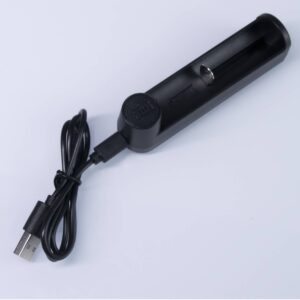
ISABER Lightsaber Battery Charger — USB-C 18650 Charger
Accessories / RGB & Baselit Lightsabers
Frequently Asked Questions
Q1: What battery does a lightsaber use?
A: Almost all modern sabers run on a single 18650 lithium-ion cell, which is 18 mm in diameter and 65 mm long with a nominal voltage of 3.7 V. Capacity in that format runs roughly 2,000 to 3,600 mAh. For a strip blade the cell needs a continuous discharge rating of about 10 A or more, because the blade is the dominant load and draws far more current than the same cell in a flashlight would.
Q2: How long does a lightsaber battery last on one charge?
A: A single-blade strip saber typically runs around an hour at usable brightness. Published figures of two to four hours describe simpler, lower-draw blades. Runtime is capacity divided by current draw, so a blade pulling eight to ten amps empties a 3,000 mAh cell in well under an hour of continuous white operation. Dimming the blade or using a shorter one extends it.
Q3: Do I need a protected 18650?
A: Protection adds a circuit that cuts the cell on over-current, over-charge, over-discharge and short circuit, which is the safety argument for a cell living inside a metal tube. The complication is that the protection board has its own lower current limit, so a protected cell can trip under a bright blade even when the cell underneath is capable. If you go protected, check the board’s rating rather than the cell’s.
Q4: Why does my saber shut off when I select a bright color?
A: That is a current problem rather than a charge problem. White is every colour channel on at once and is the highest-draw setting, so a cell that manages red or green can brown out or trip protection on white. The usual causes are a cell with too low a discharge rating or a protection board whose current limit sits below what the blade needs.
Q5: How long does it take to charge a lightsaber?
A: Roughly three to five hours on the specified 5 V input, with smaller capacities finishing sooner and strip-blade packs taking longer. Charge the saber fully switched off rather than muted or idle. A hilt that becomes genuinely hot rather than slightly warm means stopping the charge and checking the supply and cable before continuing.
Q6: Why is my battery dead when I did not use the saber?
A: A powered-off saber still draws a small standby current through its board. The figure looks negligible on paper but it is continuous, and a saber stored assembled with the cell installed can go from full to flat in weeks. A kill key — a non-conductive plug in the recharge port — breaks that circuit. If the saber has no port, remove the cell for long storage.
Q7: Can I leave the battery in the saber?
A: For a day or two, no harm. For a season, no. The standby drain is what makes the difference, and the risk is not merely a flat cell but an over-discharged one. Below roughly 2.5 V the protection circuit cuts off, and below about 2.0 V the cell is permanently damaged. Store long-term with the cell out, held at around forty to fifty percent charge.
Q8: What voltage should I store an 18650 at?
A: Around 3.7 to 3.85 V, which is roughly forty to fifty percent charged. Lithium-ion cells age fastest at both extremes, so a cell held at a full 4.2 V for months loses capacity it will not recover, and one held near the cut-off is worse. Half charge also happens to be the safest state to store a cell in. Keep it cool and dry as well; heat does as much damage as voltage.
Q9: Is an 18650 the same as a AA battery?
A: No. An AA is a 1.5 V alkaline cell, and an 18650 is a 3.7 V lithium-ion cell that is physically larger — 18 mm by 65 mm against a AA’s 14 mm by 50 mm. They are not interchangeable, and the voltage difference alone means an 18650 will not work in a device built for AA cells. The 18650 is used in sabers because the blade needs a current that an AA cannot supply without its voltage collapsing.
Q10: Can I charge an 18650 with a fast charger?
A: No. The charging circuit inside a saber is built around a 5 V input at around 1 A, and anything above 5 V is outside its design. A charger capable of higher-voltage modes should not be used on it. Computer USB ports are also a poor choice because they are underpowered for this purpose, which makes the charge slow and unreliable rather than dangerous.
18650 format
Protected vs bare
Runtime
Charging
Standby and kill key
Why white costs the most
Storage
Troubleshooting
FAQ
Q11: Why does my saber only cut out on white?
A: White drives the red, green and blue emitters at once, so it draws about three times the current of a single saturated colour. Each pixel pulls roughly 60 mA on white against roughly 20 mA on red, green or blue, which takes a two hundred pixel strip from about 4 A to about 12 A. A cell or protection board that handles the lower figure will sag or trip on the higher one.
Q12: Does a bigger capacity battery fix white cutting out?
A: No. Capacity sets how long the saber runs, not how much current it can deliver at once. What fixes a white brownout is a higher continuous discharge rating. A high-capacity cell with a modest rating will hold a long charge and still cut out on white, while a lower-capacity cell with a high rating runs white and simply needs charging sooner.
ISABER Lightsaber Battery Charger — USB-C 18650 Charger
Accessories / RGB & Baselit Lightsabers
High-quality Thickened Canvas Lightsaber Bag
Accessories / RGB & Baselit Lightsabers